- Published on
M-Pesa API: The Confusing Parts
- Authors
- Name
- Karani John
- @MKarani_

A few weeks ago, I wanted to try out the mpesa api since I see complains about it on twitter. I wanted to see if it was really that hard to implement. I was wrong. It was not hard to implement but the documentation was not clear on some parts. I'll discuss the confusing parts I encountered and how I solved them.
its friday, its blog day
A few weeks ago, I wanted to try out the daraja API and see what causes people to complain. My experience with stripe has always been delightful since it's very easy to integrate. But I have heard of the mpesa API and wanted to see, what lies beneath and why does it seem so complicated. Why would an API be so complicated to use, it's a bunch of routes to call and get what you need, if they provide it. Anyway, it is actually confusing and while its straight forward once you get it, but as developer we want things to just work.😒
So, let's dive in.
How to obtain the access_token.
I found this part to be pretty interesting. Safaricom/M-PESA will provide you with a username(consumer_key) and password(consumer_secret). The first question is, where are they? The second, what do I do with them? These two values are on the simulator once you select the app you want to use. You will copy those two values. Now we need to generate the access token by ourselves by hashing the password and username.
why?
We don't want to send our consumer_secret and password over a network for security reasons. At first, I thought it was dumb since most companies will just give you an api access token. It's a security measure and its confusing because an SDK would help with this. So we need to do in `pseudo code``.
token = base64_encode("password":"username")
Next, we call the https://sandbox.safaricom.co.ke/oauth/v1/generate?grant_type=client_credentials(since we are testing) with the Authorization header set to Basic + token (generated above).
That's it.
getting the access token...
Safaricom has now been able to identify us, it gives us a body with a property/key called "access_token" that will expire in an hour. Btw, the design of this API is interesting in a weird way. It's designed like a web app imo.At this point, we just logged in and got our access_token. You can store the access token away and use it for the next one hour instead of calling the api each time.
The best way to approach this at least for OOP guys is to use a Singleton pattern). This is great for reading, but not writing since we need to consder a concurrent environment. You can use a simple file lock when storing when the token once it expires.
Stk Push
The most common usage of the m-pesa API is STK push or in their fancy name, M-Pesa Express. This I have seen in POS, e-commerce sites and supermarkets(which are POS anyways). This what we will discuss, I can write other articles on registering your business urls, generating QR codes etc.
the confusing part
Business short code - When simulating the API, in the mpesa-daraja website, you may decide to copy the code generated to use in your own code to test. If you just copy the code and run it, it may not work. Check your test credentials by clicking the button shown below:
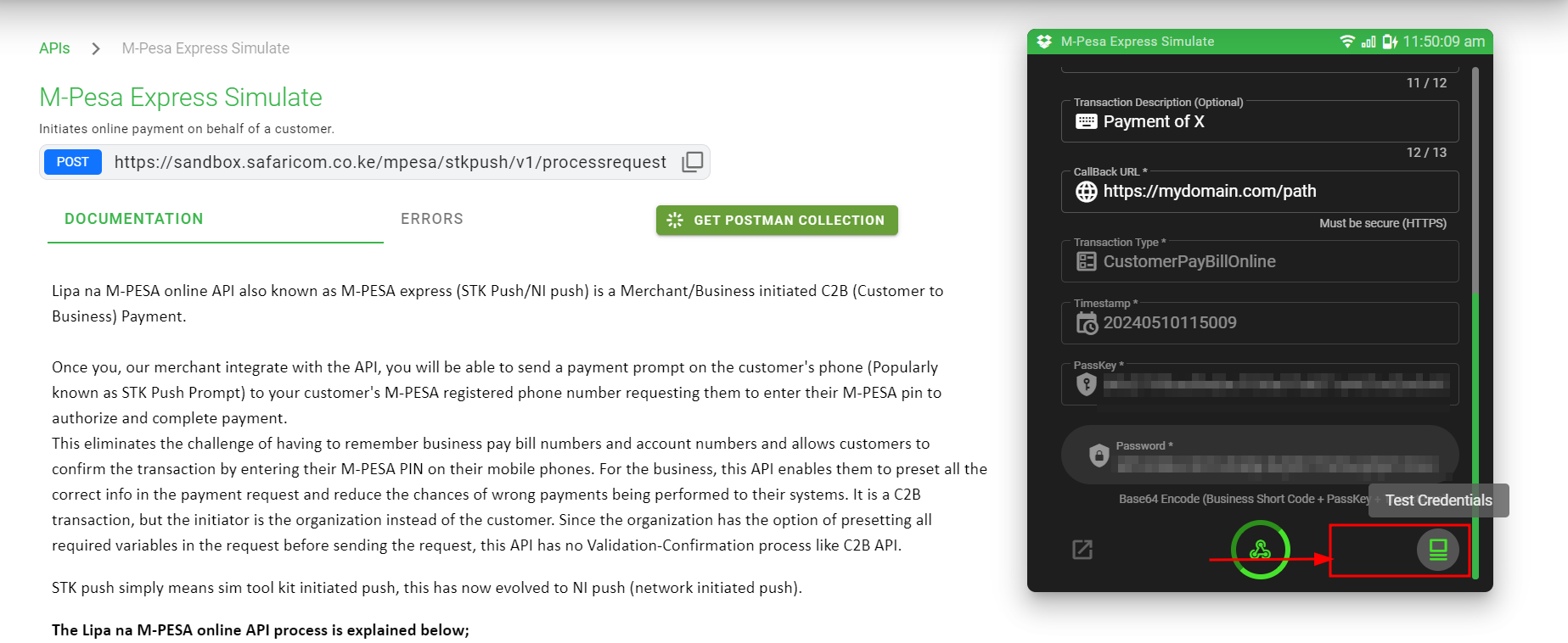 You are able to get the business short code from the test credential.
Password- This part confused me a bit. The password required is simply generated by encoding your
ShortCode+passkey+timestamp. These are concatnated into one string and then, we can generate abase_64encoding, which will be our password parameter. The timestamp should be in the formatYear+Month+Hour+Date+Hour+Minute+Second.Party A & Phone Number - They can be the same value. This will be the number that receives the stk push
party A.Call back Url - The call back url is where you need to spend the most time designing in your checkout/push. This call back url will receive a
Postrequest byMpesa API, whether the transaction is successful or not. You need to handle the errors here gracefully as this part belongs to you. You can setup different event triggers depending on the error here, retry mechanism or other items that are for usage in your backend.
Note: When you make the STK push, you will receive a response that let's you know if the push was successful or not. The callback url is meant to handle if the transaction was successful or not.
The rest of the parameters required are self explanatory and straight forward to use. I understand the frustration in the API usage and maybe design. Dumb it down by saying, its just a bunch of url I need to post to. The values required are what you need to know but I hope this can help with your checkout forms now.
I wanted to be language specific but I think that does not help anyone. At first, I wanted to build an sdk, which I did but then realised its too easy, you just need to get the confusing parts.
Happy coding ❤️